0:15
LoreMotion AI 视频生成器
想找支持动作控制的 LoreMotion 替代方案?使用 Motion Control AI,将角色图片和参考片段组合成新视频。选择动作预设,或上传你希望角色跟随的动作视频。
效果灵感
Motion Control AI 视频效果示例
功能模式
Motion Control AI 视频功能
四种面向角色视频的动作控制能力:迁移身体动作、控制手势、同步表情能量,并把参考视频里的镜头节奏带进生成结果。
工作流
Motion Control AI 如何把一张图和一段动作变成新视频
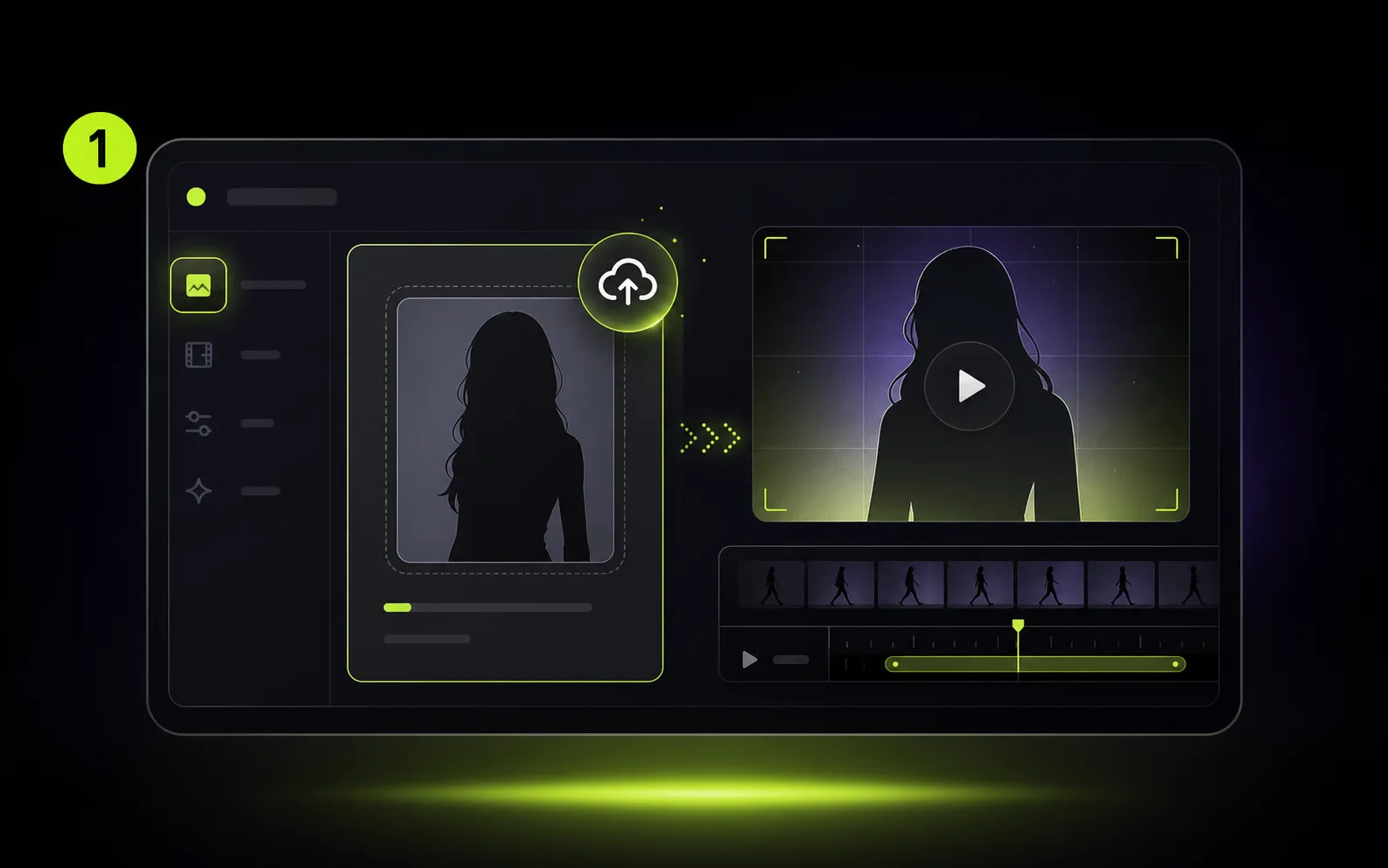
1
上传角色
从清晰的人像、全身照、虚拟头像、产品讲解人或风格化角色开始,让它来完成动作。
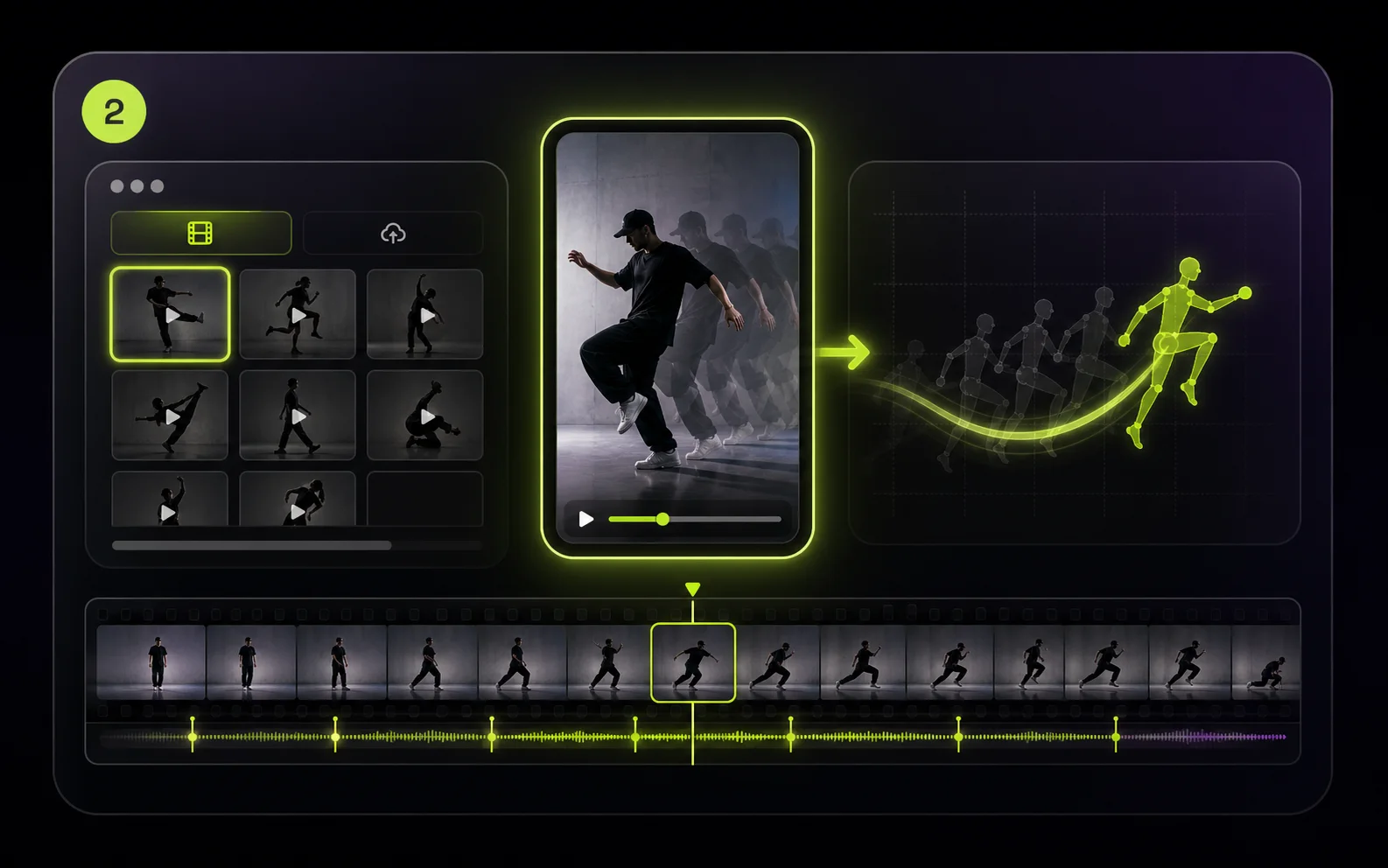
2
加入动作
选择动作库里的参考动作,或上传包含手势、舞蹈、走路循环、镜头节奏的 MP4/MOV 参考视频。
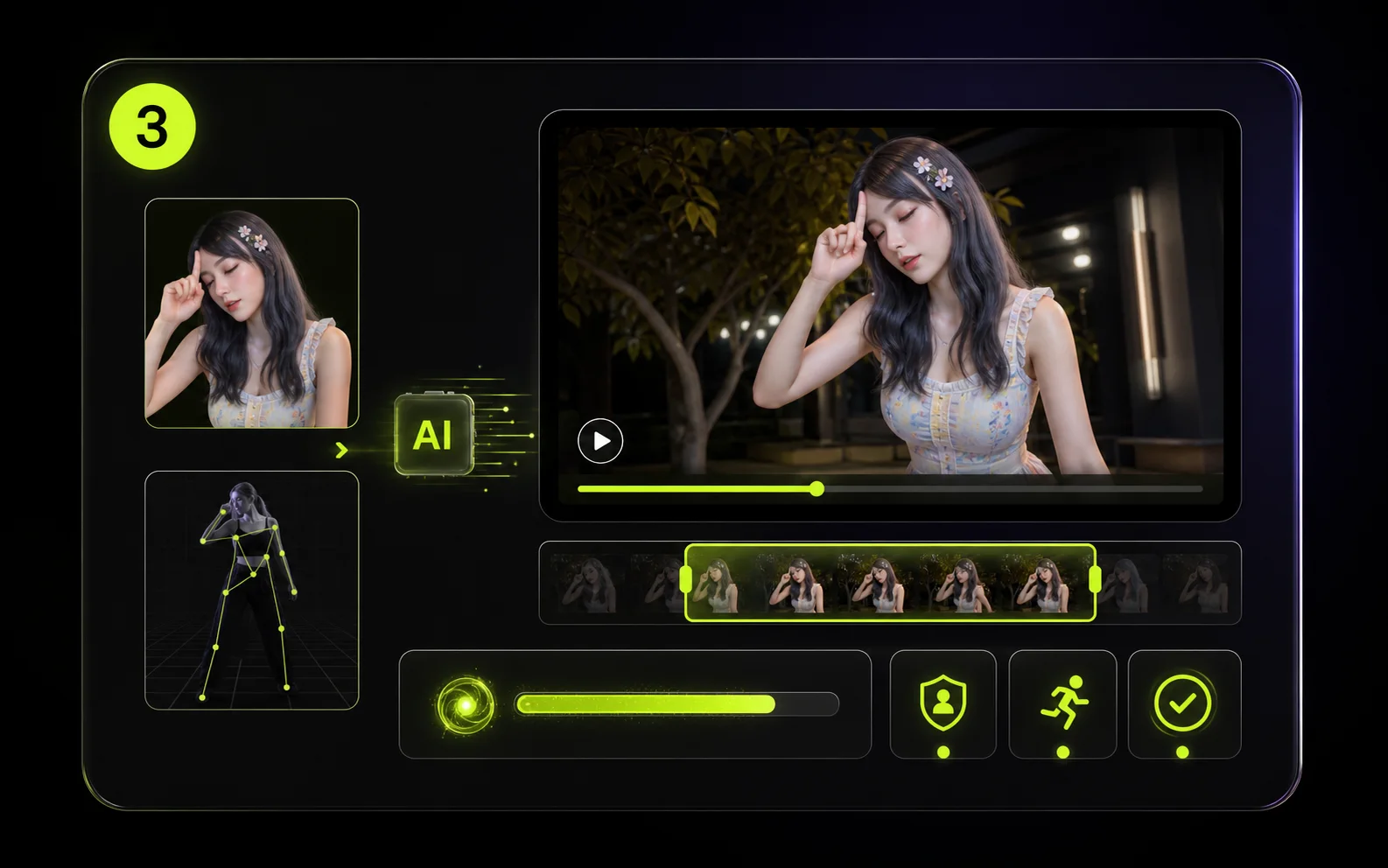
3
先渲染短测试
先生成短预览,检查身份稳定性、动作准确度和节奏,再决定是否做更长或更高清的版本。
使用场景
Motion Control AI 适合哪些真实制作流程
把一段参考动作当成可复用的导演指令,用在创作者内容、营销 campaign、课程讲解、头像频道和前期制作测试里。
创作者短视频和头像频道
把舞蹈、手势和口播节奏迁移到角色图上,不必每个 Shorts、Reels、TikTok 变体都重新拍一条。
ShortsReels头像短片
影视、动画和预演分镜
用演员参考或手机粗拍素材给角色测试、提案镜头和故事分镜提供动作方向,减少手工动画和正式拍摄前的试错。
预演分镜角色测试
营销广告和产品讲解人
把静态产品图、品牌吉祥物或讲解人图片变成有动作的广告素材,让手势、姿态和 campaign 能量在多个版本里保持一致。
产品演示品牌角色广告素材
教育课程和培训讲解
制作讲师风格短片,让手部动作、身体节奏和讲解时机匹配课程、教程、入门引导或内部培训脚本。
教程课程培训
社媒趋势动作复用
把热门动作、姿势序列或手势复用到不同角色和品牌资产上,同时让最终视频保持自己的视觉风格。
舞蹈趋势梗图视频品牌帖子
个人头像和创意实验
用真实参考动作驱动人像、风格化角色或个人头像,适合礼物视频、个人主页素材和角色表演测试。
头像礼物视频实验
相关工作流
和 Motion Control 搭配使用的 AI 视频工作流
根据视频需要的控制程度,把参考动作、图生视频、提示词生成和一键特效组合使用。
创作者笔记
创作者如何使用参考动作
Nora
视频创作者
“Motion Control AI 让我不用每个手势都重新拍,就能测试头像表演。”

Ethan
增长负责人
“这些动作 demo 能让我们很快做出社交广告的第一批变体。”
Ivy
创意制片
“上传自定义动作以后,角色镜头的导演感强很多。”
FAQ
Motion Control AI 常见问题
Motion Control AI 是什么?
Motion Control AI 用参考视频来控制角色怎么动。你上传一张角色图,选择或上传一段动作视频,然后生成一个跟随源动作的新视频。
我需要准备哪些文件?
需要一张角色图片和一段动作参考。图片支持 PNG、JPG、JPEG、WEBP、GIF,最大 10 MB;上传动作视频支持 MP4 或 MOV,最大 100 MB,也可以直接选择内置参考动作。
生成后还能保留角色身份吗?
这个流程的目标是在迁移动作的同时保留图片里的身份、服装和风格。源图片越清晰、动作越容易看懂,通常结果越稳定。
参考视频最长支持多久?
Kling Motion Control 需要能读取到参考视频时长。计费按整秒向上取整,最低按 3 秒计费,超过 30 秒的参考视频会被拒绝。
积分怎么计算?
积分由参考视频时长和输出分辨率决定:720p 每秒 10 credits,1080p 每秒 15 credits,并按整秒向上取整。
支持哪些分辨率和画面比例?
Motion Control 模型支持 720p 和 1080p 输出,画面比例支持 9:16、16:9 和 1:1。
Image / Video 方向设置是什么意思?
Image 会让最终画面更接近角色图片的构图;Video 会跟随参考视频的构图,也是多数动作片段的默认选择。Image 方向只支持 10 秒以内的视频。
什么时候要保留源视频声音?
Motion Control 可以保留参考视频原声。动作需要对齐节奏时可以开启;如果最终视频会另配音乐或旁白,可以关闭。
Motion Control AI 免费吗?
Kling 3.0 Motion Control 是积分计费功能。提交前 Create 按钮会显示需要的 credits;较短的 480p 图生视频也已调整为积分预览模型。
可以去掉水印吗?
水印默认开启。付费用户可以关闭后续视频的水印,也可以为符合条件的已完成任务去除水印。
Key Features of LoreMotion
Free AI Video Generation — No Watermark
LoreMotion generates 720p MP4 clips from text prompts with no watermark and no monthly fee. Revenue comes from a short pre-roll ad, not subscriptions.
Image to Video
Upload any image and animate it into a fluid video clip. Works with product photos, portraits, AI-generated artwork, or any still image.
Multiple Aspect Ratios
Supports 16:9 widescreen, 9:16 vertical (TikTok / Reels / Shorts), 1:1 square, and 4:3 classic — all available on the free tier.
Community Discover Feed
Browse a public gallery of user-generated videos for inspiration. Sharing is opt-in; videos are private by default.
Free AI Video Generation with No Watermark
LoreMotion's standout position is simple: generate AI videos for free with no watermark and no credit card required. It runs LTX-Video 2.5, a 22-billion-parameter diffusion transformer by Lightricks, on its own GPU cluster. Anonymous users get one generation immediately; a free account unlocks unlimited videos with a 48-hour personal library. This makes LoreMotion genuinely useful for creators who need a quick clip without committing to a subscription. The output quality is solid for general scenes, social posts, and marketing visuals — 720p H.264 with synced ambient audio.
Image to Video: Animate Any Photo
In image-to-video mode, LoreMotion takes a reference image as the first frame and generates forward motion using the selected model. This works well for product animation, portrait clips, architectural walkthroughs, and adding movement to AI-generated artwork. The image supplies the visual; the model predicts natural motion. All five models — LTX-Video 2.5, MiniMax H3, Veo 3.1, Grok 3, and Kling 2.5/3 — support image-to-video. The key limitation is that you cannot direct the motion: you cannot say "make the character dance to this specific choreography." The model decides how the image moves.
Where LoreMotion Falls Short for Character Animation
LoreMotion is purpose-built for text-to-video and image-to-video generation, not motion control. If your goal is to animate a specific character performing a specific movement — a dance, a walk cycle, a hand gesture, a facial expression — LoreMotion cannot do it. There is no way to upload a reference video and have the AI transfer that motion onto your character. The absence of motion control also means no frame-accurate body transfer, no hand/finger precision, and no camera motion replication. For general video creation these gaps don't matter. For character animation workflows they are blockers.
What Users Say About LoreMotion
What Users Like
- Genuinely free — no watermark, no monthly fee, no credit card.
- No sign-up required for the first generation.
- Fast renders: most clips finish in 60–120 seconds.
- Supports all four common aspect ratios including vertical for TikTok.
- AI prompt enhancement rewrites prompts for better results.
What Users Dislike
- No motion control — cannot animate a character with a reference video.
- Pre-roll ad on every generation; disruptive for high-volume workflows.
- Free tier limited to 720p; no 1080p option without premium.
- Clip duration capped at 8 seconds on free; short for complex scenes.
- No built-in reference video presets or motion library.
LoreMotion vs MotionControlAI
| Feature | LoreMotion | MotionControlAI |
|---|---|---|
| Motion control — animate character with reference videokey | ||
| Kling 3.0 frame-accurate transferkey | ||
| Body motion transferkey | ||
| Facial expression transfer | ||
| Hand & finger motion | ||
| Cinematic camera motion mode | ||
| Text to video | ||
| Image to video (free) | ||
| Free tier with no watermark | ||
| No sign-up for first generation | ||
| Reference video preset library | ||
| Public gallery / Discover feed | ||
| Multiple aspect ratios |
✓ Supported · ~ Partial support · ✗ Not available
When to Use MotionControlAI Instead of LoreMotion
01
You Need Motion Control
LoreMotion cannot animate a character using a reference video. MotionControlAI is built specifically for this — upload a character image and a reference clip, and Kling 3.0 transfers the motion frame-accurately.
02
Precise Body, Face & Hand Transfer
MotionControlAI supports four motion modes: full body, hand/finger control, facial expression, and cinematic camera motion. LoreMotion offers none of these directed animation modes.
03
Character Identity Consistency
Kling 3.0 preserves your character's exact appearance across every generated frame — face, outfit, proportions. General video generators like LoreMotion do not guarantee character consistency.
When LoreMotion Works — and When You Need Motion Control
Quick Social Clips and Marketing Videos (LoreMotion)
If you need a quick atmospheric video — a landscape with motion, a product floating in space, a cinematic scene from a text description — LoreMotion is fast and free. Write a prompt, pick your aspect ratio, and download a 720p clip with no watermark in about 90 seconds. For content creators who just need background footage, B-roll, or general visual content at zero cost, it is a practical tool.
Character Animation with Specific Movement (MotionControlAI)
When you have a specific character — a brand mascot, an anime avatar, a portrait, an illustration — and you need it to perform a specific movement, LoreMotion cannot help. MotionControlAI's motion control workflow is: upload character image + upload or select reference video → Kling 3.0 maps the motion onto your character. The output preserves the character's visual identity while executing the exact choreography, gesture, or cinematic movement from the reference.
Dance Content, Viral Trends, and Virtual Influencers (MotionControlAI)
For creators building virtual influencers or producing dance content at scale, motion control is the core capability. Record or source a trending choreography clip, apply it to your character, and publish. MotionControlAI's preset reference video library means you can start without sourcing your own motion clips. The consistent character identity across multiple generations makes it possible to build a recognizable AI persona — something a general text-to-video tool like LoreMotion cannot replicate.
FAQs
What is LoreMotion?▾
LoreMotion is a free AI video generator at loremotion.com. It runs LTX-Video 2.5 and MiniMax H3 on its own GPU cluster, letting users generate 720p clips from text prompts or images with no watermark and no sign-up required for the first video. It focuses on general text-to-video and image-to-video generation.
Does LoreMotion support motion control?▾
No. LoreMotion does not offer motion control — the ability to animate a specific character image using the movements from a reference video. It generates video from prompts and images, but cannot transfer body motion, facial expressions, or camera movement from a reference clip onto a character. MotionControlAI is purpose-built for this workflow.
Is LoreMotion really free with no watermark?▾
Yes. LoreMotion supports itself through pre-roll ad impressions rather than subscriptions, so the generated videos carry no watermark and are free for commercial use. Anonymous users get one free generation; a free account unlocks unlimited generations. MotionControlAI also offers a free tier with no watermark for motion control video generation.
What is the difference between LoreMotion and MotionControlAI?▾
LoreMotion is a general-purpose AI video generator optimized for text-to-video and image-to-video creation. MotionControlAI is specialized for motion control — you upload a character image and a reference video, and the AI transfers the exact motion (body, hands, face, or camera) from the reference onto your character using Kling 3.0. If you want to animate a specific character with a specific movement, MotionControlAI is the right tool.
Can I animate a character photo to dance using LoreMotion?▾
Not precisely. LoreMotion can generate a video starting from an image, but it generates forward motion based on the model's predictions — you cannot supply a dance reference video for the character to follow. MotionControlAI lets you upload a dance clip as the motion reference, and Kling 3.0 maps that exact choreography onto your character frame-by-frame.
Which AI models does LoreMotion use?▾
LoreMotion's free tier uses LTX-Video 2.5 (22B parameter diffusion transformer by Lightricks) and MiniMax H3. Premium tiers add Google Veo 3.1, xAI Grok 3, and Kling 2.5/3.0. MotionControlAI uses Kling 3.0 specifically for its motion control pipeline, which is currently the most accurate model for reference-based character animation.